A birthday card app that revealed a bigger opportunity.
It started simply: I needed to send birthday invitations for my kid's party. The existing tools were either too generic (Evite) or too friction-heavy (printed cards with manual RSVP tracking). So I built a birthday card and invitation app — animated flip cards, email delivery via Resend, one-tap RSVP tracking with no account required. It shipped. Real guests responded through it.
Then I needed to plan a multigenerational family trip to Southern Utah — Zion, Bryce Canyon, Kanab — and built DiboTrip to consolidate itineraries, bookings, and packing lists. Then Cook-em, a gamified cooking app for kids using Claude's vision capabilities. Three separate apps, three separate codebases, all solving problems no existing tool handled well for families.
But the birthday invitation app was different from the others. Trip planning and cooking are household-internal — one family, managing itself. The invitation flow naturally sat at the layer between families: creating an event, reaching out to other parents, tracking who's coming. That distinction turned out to be the strategic insight that reshaped everything.
What if the real opportunity isn't building a better household organizer — it's owning the coordination layer between families that no one else has claimed?
A crowded market with a genuine gap.
I researched every family management app I could find: Cozi, Maple, FamilyWall, familymind, Sense, Jam, Classlist, OurHome, Spond, Family Tools. The space is active but fragmented. What I found was that almost every competitor is inward-facing — they help a single household organize itself. None of them own the parent-to-parent coordination layer.
| App | Strength | Gap |
|---|---|---|
| Cozi | 20M+ users, simple calendar + lists | Single-household only, dated UI, ad-heavy |
| Maple | AI assistant, email parsing, modern UX | Focused on household efficiency, no social layer |
| FamilyWall | Full-featured (calendar, location, photos) | Complex, expensive, no inter-family coordination |
| Sense / Jam | Auto-import school emails into calendar | Narrow feature set, no broader platform |
| Classlist | School parent community + events | UK-focused, school-only, not a daily tool |
| Family Launchpad | Enters through the inter-family coordination layer — the space between households where events, invitations, playdates, and logistics are shared across families. | |
"Every competitor helps one family manage itself. Nobody helps families coordinate with each other. That's the gap."
Two paths emerged. The harder one is the real opportunity.
The competitive research revealed two coherent product directions. I documented both deliberately — not to hedge, but to make the strategic choice visible.
A personal operating system for the family unit. Calendar, tasks, homework, meal planning. The user is the family administrator seeking cognitive relief. This is what Cozi, Maple, and FamilyWall already do. Differentiation would come from design quality and AI features — but the moat is shallow. Works on day one for a single user. Safer to build, harder to defend.
A gathering place for the informal network of families around you — neighbors, school friends, teammates. Every feature has a sharing dimension baked in. Events flow outward. Tasks can be assigned across families. The invitation flow — the product's original feature — becomes the strategic centerpiece. Network effects create a genuine moat. Harder to build, harder to replicate.
Build Path A for the initial launch — it works without network effects and demonstrates value immediately. But design and build the invitation flow to Path B's standard from day one. Every invitation sent is a potential new family joining the village. The bridge between both paths is the RSVP flow.
The viral loop
Every event invitation — whether sent via text message or email — pulls a new parent onto the platform. SMS invitations are a first-class channel because phone numbers are the social currency of parent networks. Everyone has each other's numbers from group texts and school directories; email addresses require a separate ask. This removes the biggest friction point in the growth engine.
The Circles feature — invite-only groups tied to shared contexts like "Ms. Johnson's 2nd Grade" or "Saturday Soccer U8" — creates network effects that are hard for competitors to replicate. A single-household calendar is useful alone, but it becomes dramatically more useful when connected to other families in your orbit.
Three phases. Ship in sub-phases. Learn from usage.
Transform the app from a birthday card tool into something parents open every day. Family calendar with per-child views. Extended event types with SMS + email invitations and shareable RSVP links. School event tracker with AI-powered email import (forward a newsletter, events are extracted automatically). Homework tracker. Parent Circles. Morning briefing notifications.
Advanced email intelligence with auto-forwarding rules and sender recognition. Carpool coordination matching families going to the same events. Activity and camp discovery marketplace. Chore tracking with optional gamification. Document vault for medical records and school forms.
School and organization partnerships with auto-published calendars. Co-parenting tools. Multi-generational access for grandparents and caregivers. Family dashboard command center. Full marketplace and monetization infrastructure.
Phase 1a implementation plan
A detailed 6–8 week sprint-level build plan covers the first shippable increment. Database schemas in Turso, API routes in Next.js, the Launchpad grid home screen, calendar month/week/day views, Google Calendar sync via OAuth, Apple Calendar via iCal feed, and a beta launch with 10–15 families.
Launchpad controller meets hand-drawn warmth.
The design language draws from two unexpected sources: the Novation Launchpad (a grid-based music controller) and The Mitchells vs. The Machines (Sony's animated film with its hand-drawn, watercolor-textured aesthetic).
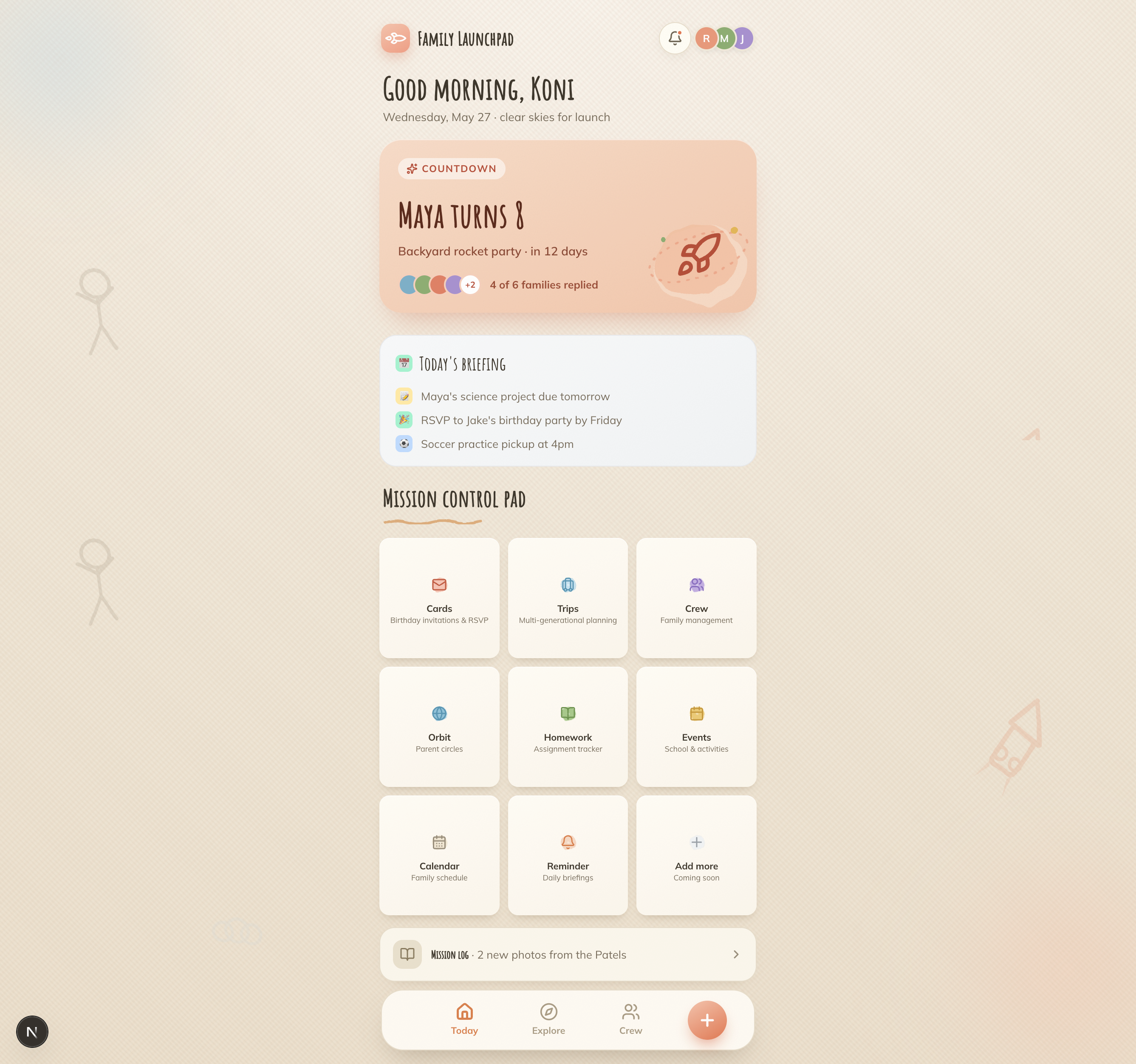
Visual exploration: From inspiration to interface
A Launchpad controller organizes complex things — loops, samples, scenes — into a simple color-coded grid you can navigate at a glance. That maps perfectly to family management: each pad is a zone of family life, and you tap into whichever zone you need. The mental model is "I have a control surface for my family's chaos."
I'm iterating through different visual approaches to translate this inspiration into actual interface design. The goal is finding the balance between the structured grid metaphor and the warm, hand-drawn aesthetic that makes family coordination feel human rather than robotic.

The Mitchells vs. The Machines influence
The film's visual philosophy is deeply relevant to Family Launchpad's positioning. The Mitchells' world is hand-drawn, textured, imperfect — watercolor bleeds, doodle overlays, fiber textures. The robot world is sterile, geometric, and clean. The film's thesis is that humanity lives in the imperfections.
That's exactly the emotional territory Family Launchpad occupies. The competitors are the robot world: functional, grid-perfect, emotionally flat. Family Launchpad should feel like the Mitchells themselves — warm, messy, human, alive. Concretely, this means:
"The Launchpad grid gives structure. The Mitchells aesthetic gives soul. Together they create something no competitor has: a family tool that actually feels like family."
Four revenue streams. No ads. No data selling.
The deliberate choice to go ad-free and privacy-first is a brand differentiator, not just a tactic. Cozi's ad-heavy free tier is consistently their most-criticized feature. Parents in a task-completion mindset find ads especially intrusive.
$5.99/month or $49.99/year. Free tier is genuinely useful (calendar, 3 AI email imports/month, 1 Circle). Pro unlocks unlimited children, unlimited imports, calendar sync, morning briefings, document vault. Priced between Cozi Gold (~$39/yr) and Maple+ ($9.99/mo).
Local providers pay for listings ($50–$200/month) or cost-per-lead. Hyper-targeted to parent clusters organized by school/activity/neighborhood. 500 active families in a metro area is a compelling pitch. Potential to exceed subscription revenue by Year 2.
Pro Circles for large groups (PTAs, leagues) at $2.99/month per admin. Payment collection within Circles for group gifts and activity fees with standard processing fees.
$500–$2,000/year for official calendar integrations. When 50 parents at the same school are forwarding the same newsletter, the pitch to the school is obvious.
Not a feature. A pipeline.
AI isn't bolted on as a marketing checkbox. It's built into the data pipeline at the points where it genuinely reduces parent effort.
Email-to-calendar import
Parents forward a school newsletter to their Family Launchpad import address. Resend Inbound receives the email and sends a webhook to a Next.js API route. Claude API (Sonnet) extracts structured event data — names, dates, times, locations — and returns JSON. The parent reviews extracted events on a confirmation screen and batch-adds them to the calendar with one tap.
This was originally scoped for Phase 2, but analysis showed Resend Inbound + Claude API makes it achievable in roughly 1.5–2 weeks with the existing stack. Cost per import is negligible — newsletter bodies are typically under 2K tokens, making each extraction a fraction of a cent. It was pulled into Phase 1 because it directly competes with Sense and Jam while living inside a broader platform.
AI as development co-author
Beyond product features, AI is woven into how I build. I use Claude Code in the terminal for agentic tasks — refactoring schema changes across files, setting up new API routes, debugging build errors. I use Claude in the browser for architecture thinking, PRD iteration, competitive research, and design exploration. The result is a faster feedback loop between design intent and shipped code.
Chosen for fast iteration and low overhead.
Every choice has a reason. The stack is designed for a solo builder shipping real features to real families, with a clear migration path as the platform scales.
The gap between designing it and building it is where the real decisions live.
This project started as three separate apps. Then it became a unified platform. Then competitive research reshaped the entire product strategy. The design language evolved from generic productivity app to a Launchpad-controller grid with hand-drawn Mitchells-inspired warmth. The feature set was pruned (meal planning cut), expanded (email import pulled into V1), and reoriented around inter-family coordination.
What I'm learning is that product strategy and visual design aren't separate disciplines — they're the same conversation at different levels of abstraction. The decision to position the product around coordination between families didn't just change the feature set. It changed the color palette, the naming convention, the onboarding flow, the monetization model, and the emotional register of the brand.
The other thing I'm learning is what it means to build something you're also the user of. The feedback loop is brutally honest. When your own family can't figure out a flow you designed, you can't blame the research.